
Ubuntu Theme Launcher1.4 - Get APK
You'll be able to download in few seconds.
Publisher Description
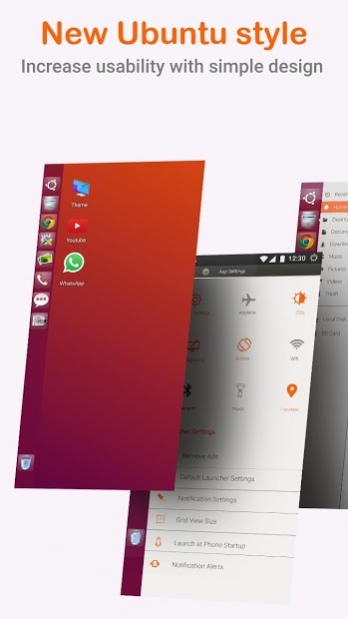
Launcher for Ubuntu style is the Ubuntu version of mobile launcher which give a Ubuntu and Linux computer style look on your Android? You love the new style of Ubuntu? Check this Ubuntu style launcher available for your Android (TM) smart phones.
Ubuntu Linux UI Design:
Ubuntu Launcher for Mobile is here for you (Inspired by Ubuntu). Customize your phone with unique look and feel of the fastest launcher. Amaze your loved one with Ubuntu look of your Android and also share it with your loved ones.
Support of Ubuntu Linux File manager
With built-in support of File Explore and File Manager you can search and explore your files and Folders, Copy, Paste, Zip/Unzip, RAR, Delete Files, Share Files and can do lot more...
Explore your file system with this simple and efficient file explorer and file manager in native desktop computer design. You will be amazed at the interface that resembles my computer's directory.
Features:
- Start Menu for Ubuntu Linux
- Android application in Stylish Tiles - In Start Menu
- Best application are available on One Click - Create Shortcuts of most used application on Desktop by press and Hold Feature.
- Easy Navigation to the Apps
- Built-In support of File Explorer in Ubuntu theme
- Create Folders, Cut, Copy, Paste, Move, Share etc.
- Listing of all of your drives, SD Card, Storage, audio and video files and pictures in PC style.
- Taskbar for Ubuntu style
- put the files to Recycle Bin and delete later in Ubuntu style
- Built-in ZIP support allows you to decompress or extract ZIP/RAR files
- Action Center. Notifier Center: Like windows 10 launcher, the computer also has a action center bar. You can check the notice of application or system with Notification Center.
Update Features :
- Desktop Widgets
- Android P type desktop menu
- Drag and drop Improved
- Clock Widget
- Weather Widget
- RAM info widget
- Changeable desktop folders
- Music Player widget
- Live Wallpapers
- Photo tiles changeable
- Task-bar icons removable
- Desktop App Folders
- Weather, Calendar and Photos tiles Added
- Task-bar Transparency option added
- Improved Themes Compatibility
- Multi Tasking Made optional (enable /disable from settings)
- Lock Screen
- Multi Color Support for Task bar and menu
- Themes and Icon Pack - Android TV /Tablet support
- Hide Applications
- Desktop Icons Removable
- Add Applications in Start Menu (Paid Only)
- Change the Start Menu Application (Press and Hold the app to change)
- Change applications in Task-bar (Press and Hold)
- Built-In Gallery Feature added
- Photo Tile changeable
Up Comings
- Widgets in desktop mode
- Task manger
- Built in apps (Photo viewer , video payer etc)
About Ubuntu Theme Launcher
The company that develops Ubuntu Theme Launcher is Sublime Launchers and Themes. The latest version released by its developer is 1.4.
To install Ubuntu Theme Launcher on your Android device, just click the green Continue To App button above to start the installation process. The app is listed on our website since 2019-05-30 and was downloaded 0 times. We have already checked if the download link is safe, however for your own protection we recommend that you scan the downloaded app with your antivirus. Your antivirus may detect the Ubuntu Theme Launcher as malware as malware if the download link to com.sublime.launcher.ubuntu is broken.
How to install Ubuntu Theme Launcher on your Android device:
- Click on the Continue To App button on our website. This will redirect you to Google Play.
- Once the Ubuntu Theme Launcher is shown in the Google Play listing of your Android device, you can start its download and installation. Tap on the Install button located below the search bar and to the right of the app icon.
- A pop-up window with the permissions required by Ubuntu Theme Launcher will be shown. Click on Accept to continue the process.
- Ubuntu Theme Launcher will be downloaded onto your device, displaying a progress. Once the download completes, the installation will start and you'll get a notification after the installation is finished.
Program Details
System requirements
Download information
Pricing
Version History
version 1.4
posted on 2019-05-30
Version 1.4
Disclaimer
External Download
We do not host Ubuntu Theme Launcher on our servers. We did not scan it for viruses, adware, spyware or other type of malware. This app is hosted by Galad and passed their terms and conditions to be listed there. We recommend caution when installing it.
The APK Download link for Ubuntu Theme Launcher is provided to you by apps112.com without any warranties, representations or guarantees of any kind, so access it at your own risk.
If you have questions regarding this particular app contact the publisher directly. For questions about the functionalities of apps112.com contact us.
